파일 업로드(file upload)
웹 브라우저에서 서버로 파일을 전송하여 서버에 저장하는 것을 말하며, 서버로 업로드할 수 있는 파일에는 텍스트 파일, 바이너리 파일, 이미지 파일, 문서 등 다양한 유형이 있음.
웹 브라우저에서 서버로 파일을 전송하기 위해 JSP 페이지에 폼 태그를 사용하고, 전송된 파일을 서버에 저장하기 위해 오픈 라이브러리를 이용해야함.
// 기본 형식

<form action="JSP 파일" method="POST" enctype="multipart/form-data">
	<input type="file" name="요청 파라미터 이름">
</form>

<form method="post" enctype="multipart/form-data" action="process.jsp">
	<p> 제목 : <input type="text" name="title">
	<p> 파일 : <input type="file" name="fileName">
	<p> <input type="submit" value="submit">
</form>
** form태그의 method 속성은 반드시 POST 방식으로 설정.
** form태그의 enctype 속성은 반드시 multipart/form-data로 설정
** form 태그의 action 속성은 파일 업로드를 처리할 JSP 파일로 설정
** 파일 업로드를 위해 input 태그의 type 속성을 file로 설정해야 하며, 만약 여러 파일을 업로드하려면 2개 이상의 input 태그를 사용하고 name 속성에 서로 다른 값을 설정.
MultipartRequest를 이용한 파일 업로드
웹 페이지에서 서버로 업로드되는 파일 자체만 다루는 클래스.
웹 브라우저가 전송한 multipart/form-data 유형과 POST 방식의 요청 파라미터 등을 분석한 후 일반 데이터와 파일 데이터를 구분하여 파일 데이터에 접근.
또한 한글 인코딩 값을 얻기 쉽고, 서버의 파일 저장 폴더에 동일한 파일명이 있으면 파일명을 자동으로 변경함.
cos.jar파일이 lib에 들어있어야 사용 가능!
Servlets.com | com.oreilly.servlet
www.servlets.com
여기서
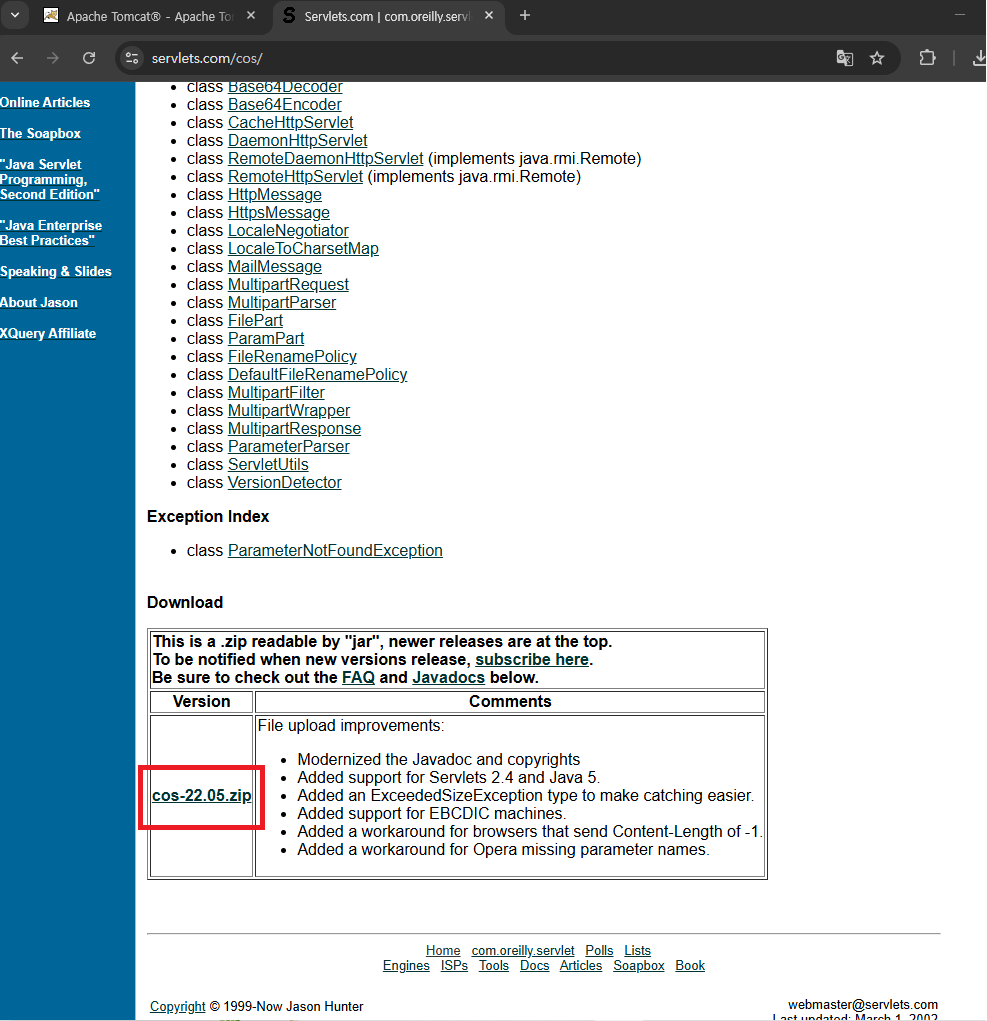
MultipartRequest 클래스를 이용하여 파일을 업로드하려면 먼저 MultipartRequest 객체를 생성하고, 생성된 객체를 통해 MultipartRequest 클래스가 제공하는 메소드를 사용하여 웹 브라우저가 전송한 multipart/form-data 유형의 요청 파라미터를 읽어오고 파일을 업로드.
MultipartRequest 클래스 생성
이 클래스는 다양한 생성자를 제공하는데 그중에서 한글 인코딩 값을 쉽게 얻을 수 있고, 업로드되는 파일이 서버에 저장된 기존 파일과 중복될 때 자동으로 변경해주는 생정자의 형식은 아래와 같음.
MultipartRequest(javax.servlet.http.HttpServletRequest request,
		java.lang.String saveDirectory,
		int maxPostSize,
		java.lang.String encoding,
		FileRenamePolicy policy)

MultipartRequest multi = new MultipartRequest(request,
						"C:\\\\upload", 5*1024*1024, "utf-8",
						new DefailtFileRenamePolicy())
MultipartRequest 메소드 종류
| 메소드 | 유형 | 설명 |
| getContentType(String name) | String | 업로드된 파일의 콘텐츠 유형을 반환. 업로드된 파일이 없으면 null을 반환 |
| getParameter(String name) | String | 요청 파라미터 이름이 name인 값을 전달 받음. |
| getParameterNames( ) | java.util.Enumeration | 요청 파라미터 이름을 Enumeration 객체 타입으로 반환 |
| getFile(String name) | java.io.File | 서버에 업로드된 파일에 대한 파일 객체를 반환한다. 업로드된 파일이 없으면 null 반환 |
| getFileNames( ) | java.util.Enumeration | 폼 페이지에 input 태그 내 type속성 값이 file로 설정된 요청 파라미터의 이름을 반환 |
| getFilesystemName(String name) | String | 사용자가 설정하여 서버에 실제로 업로드된 파일명을 반환. 파일명이 중복되면 변경된 파일명을 반환. |
| getOriginalFileName(String name) | String | 사용자가 업로드한 실제 파일명을 반환. 파일명이 중복되면 변경 전의 파일며을 반환. |
톰캣 11버전은 jar없어도 가능한테 web-lnf에서 web.xml에서
<web-app xmlns="http://java.sun.com/xml/ns/javaee"
         xmlns:xsi="http://www.w3.org/2001/XMLSchema-instance"
         xsi:schemaLocation="http://java.sun.com/xml/ns/javaee
                             http://java.sun.com/xml/ns/javaee/web-app_3_0.xsd"
         version="3.0">
	<welcome-file-list>
		<welcome-file>index.html</welcome-file>
		<welcome-file>index.htm</welcome-file>
		<welcome-file>index.jsp</welcome-file>
		<welcome-file>index.xhtml</welcome-file>
		<welcome-file>default.html</welcome-file>
		<welcome-file>default.htm</welcome-file>
		<welcome-file>default.jsp</welcome-file>
		<welcome-file>default.xhtml</welcome-file>
	</welcome-file-list>

	<servlet>
      <servlet-name>FileUploadProcessServlet</servlet-name>

      <jsp-file>/ch07/fileupload01_process.jsp</jsp-file>

      <multipart-config>
          <max-file-size>5242880</max-file-size>
          <max-request-size>5242880</max-request-size>
      </multipart-config>
  </servlet>

  <servlet-mapping>
      <servlet-name>FileUploadProcessServlet</servlet-name>

      <url-pattern>/ch07/fileupload01_process.jsp</url-pattern>
  </servlet-mapping>

</web-app>
이렇게 수정하고
<%@ page contentType="text/html; charset=utf-8" %>
<%@ page import="java.util.*" %>
<%@ page import="java.io.*" %>


<%
    // 1. 파일 저장 경로 설정
    String savePath = "E:/JJ_JSP/upload";

    // 2. 경로가 없으면 폴더 생성
    File uploadDir = new File(savePath);
    if (!uploadDir.exists()) {
        uploadDir.mkdirs();
    }

    // 3. 일반 폼 필드(name, subject) 값 받기
    // @multipart-config가 추가되었기 때문에 이제 정상 작동합니다.
    request.setCharacterEncoding("utf-8"); // 한글 깨짐 방지
    String nameParam = request.getParameter("name");
    String subjectParam = request.getParameter("subject");

    out.println("name = " + nameParam + "<br>");
    out.println("subject = " + subjectParam + "<br>");
    out.println("------------------------------------<br>");

    // 4. 파일 폼 필드(filename) 값 받기
    // @multipart-config가 추가되었기 때문에 filePart가 더 이상 null이 아닙니다.
    Part filePart = request.getPart("filename");
    String fileName = filePart.getSubmittedFileName(); // 실제 원본 파일명

    // 5. 파일이 실제로 첨부되었는지 확인
    if (fileName != null && !fileName.isEmpty()) {

        // 6. 파일 정보 출력
        out.println("요청 파라미터 이름 : " + filePart.getName() + "<br>");
        out.println("실제 파일 이름 : " + fileName + "<br>");
        out.println("저장 파일 이름 : " + fileName + "<br>");
        out.println("파일 콘텐츠 유형 : " + filePart.getContentType() + "<br>");
        out.println("파일 크기 : " + filePart.getSize() + " bytes");
        out.println("<br>");

        // 7. 파일 저장
        filePart.write(savePath + File.separator + fileName);

    } else {
        // 파일이 첨부되지 않은 경우
        out.println("업로드된 파일이 없습니다.");
    }
%>
이렇게 코드 작성하면 들어가긴 함.
https://commons.apache.org/io/download_io.cgi
Download Apache Commons IO – Apache Commons IO
Download Apache Commons IO Using a Mirror We recommend you use a mirror to download our release builds, but you must verify the integrity of the downloaded files using signatures downloaded from our main distribution directories. Recent releases (48 hours)
commons.apache.org
DiskFileUpload 클래스의 메소드
| 메소드 | 유형 | 설명 |
| setRepositoryPath(String repositoryPath) | void | 업로드된 파일을 임시로 저장할 디렉터리를 설정한다. |
| setSizeMax(long sizeMax) | void | 최대 파일의 크기를 설정한다. |
| setSizeThreshold(int sizeThreshold) | void | 메모리상에 저장할 최대 크기를 설정한다. |
| parseRequest(HttpServletRequest req) | List<FileItem> | multipart/form-data 유형의 요청 파라미터를 가져온다. |
FileItem 클래스의 메소드
| 메소드 | 유형 | 설명 |
| isFormField() | boolean | 요청 파라미터가 파일이 아니라 일반 데이터인 경우 true를 반환한다. |
| getFieldName() | String | 요청 파라미터의 이름을 얻어온다. |
| getString() | String | 기본 문자 인코딩을 사용하여 요청 파라미터의 값을 얻어 온다. |
| getString(String encoding) | String | 설정한 문자 인코딩을 사용하여 요청 파라미터의 값을 얻어 온다. |
| getName() | String | 업로드된 파일(경로 포함)의 이름을 얻어온다. |
| getSize() | long | 업로드된 파일의 크기를 얻어온다. |
| get() | byte[] | 업로드된 파일을 바이트 배열로 얻어온다. |
| isInMemory() | boolean | 업로드된 파일이 메모리에 저장된 상태인 경우 true를 반환하고, 임시 디렉터리에 저장된 경우 false를 반환한다. |
| delete() | void | 파일과 관련된 자원을 삭제한다. 메모리상에 저장된 경우 할당된 메모리를 반환하고, 임시 파일로 저장된 경우 파일을 삭제한다. |
| write() | void | 파일과 관련된 자원을 저장한다. |
| getContentType() | String | 웹 브라우저가 전송하는 콘텐츠 유형을 반환하고, 정의되어 있지 않은 경우 null을 반환한다. |
실습중

'JSP' 카테고리의 다른 글
| [JSP] 다국어 처리 (0) | 2025.12.04 |
|---|---|
| [JSP] 유효성 검사 (0) | 2025.12.04 |
| [JSP] 폼(form) 태그 (0) | 2025.12.03 |
| [JSP] 기본 내장(Implicit) 객체 정리 (1) | 2025.12.03 |
| [JSP] 내장 객체_3 (0) | 2025.12.03 |